Flutterのレイアウト入門(Column / Row / Stack の使い分け) の次に、画面を少し作り始めると早めに出てくるのが「色や文字サイズをどこへ置くか」という問題です。止まりやすいのは API 名そのものではなく、Color と TextStyle を各 Widget へ直書きしたまま画面を増やしてしまうことにあります。この記事では、ThemeData で Material 標準トークンをそろえる流れと、業務アプリ固有の値を ThemeExtension へ分ける最小構成を整理します。
1. ゴールと非対象
対象読者
- Flutter の環境構築、Dart 入門、
Column/Row/Stackの基本までは終わった人 - 画面ごとに
Color(0xFF...)やTextStyle(...)を書き始め、あとでどこを直せばよいか追いにくくなってきた人 ThemeDataは見たことがあるが、ThemeExtensionをいつ出すべきかまだ曖昧な人
この記事で到達する状態
ThemeDataとThemeExtensionの役割差を説明できる- 色、文字、ボタンの見た目を
ThemeDataへ寄せられる - 業務固有のステータス色を
ThemeExtensionで型付き管理できる - 「どこまで
ThemeData、どこからThemeExtension」の判断基準を持てる
非対象
- ダークモードの永続化
- Riverpod などでのテーマ状態管理
- Material 3 全体の仕様解説
- 複数ファイルへの分割設計
今回の主題は、デザインの好みではありません。見た目の値をどこへ置くと、画面追加や調整のときに追いやすくなるかです。ここが整理できると、次の記事で Container や SizedBox を使うときも、余白と装飾とテーマの責務を混ぜにくくなります。
2. 先に ThemeData と ThemeExtension の役割を分ける
最初に、2 つの API の役割を分けます。
| 置き場 | 向く値 | まず見るポイント | 典型例 |
|---|---|---|---|
ThemeData | Material 標準コンポーネントが読む値 | colorScheme / textTheme / appBarTheme / filledButtonTheme | AppBar、本文文字、ボタン、標準カード |
ThemeExtension | アプリ固有で、ThemeData に載せにくい値 | Theme.of(context).extension<T>() | 受注ステータス色、業務画面専用パネル色、独自トークン |
迷ったときの流れを先に置くと、次の通りです。
flowchart TD
  A[追加したい見た目の値] --> B{Material標準の役割で説明できるか}
  B -->|はい| C[ThemeDataへ置く]
  B -->|いいえ| D{アプリ内で用途名として再利用するか}
  D -->|はい| E[ThemeExtensionへ置く]
  D -->|いいえ| F[局所的な値として直書きも可]
例えば、アプリ全体の主色や本文テキストの大きさは ThemeData で持つと読みやすくなります。対して「出荷待ちの背景色」「保留の文字色」のような業務固有トークンは、ColorScheme の役割名では説明しにくいため ThemeExtension のほうが向いています。
3. まずは直書き状態を見て、何がつらいかを固定する
以降のコード例はすべて lib/main.dart にそのまま貼って flutter run で確認できます。外部パッケージ不要のため、DartPad でも試せます。
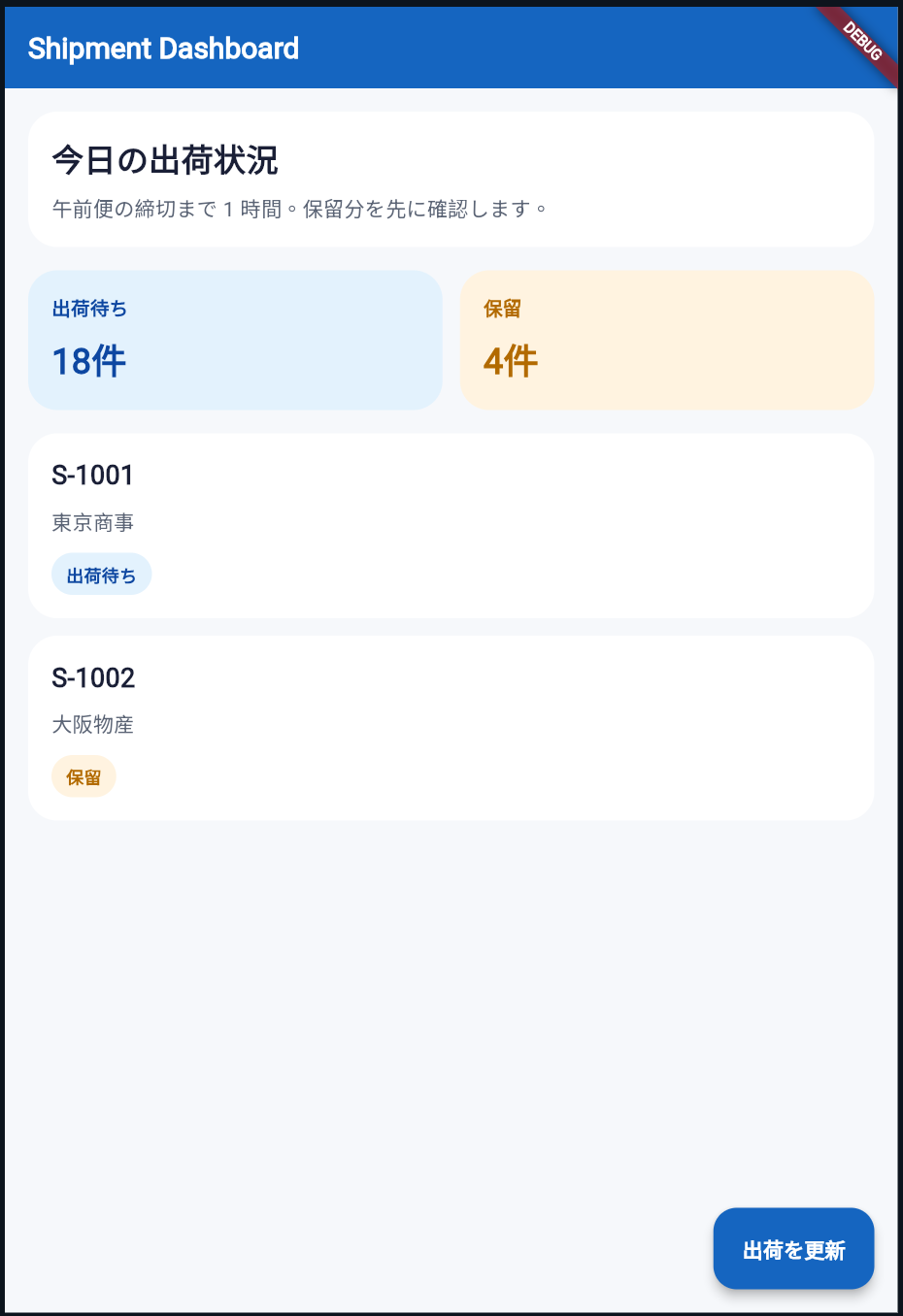
まずは、色や文字サイズを各所へ直書きした状態です。動きますが、見た目を調整したくなった瞬間に修正箇所が散ります。
lib/main.dart は次の内容です。
このファイルは、色や文字サイズを各 Widget へ直書きした状態を意図的に残したサンプルです。注目点は、見た目の値が複数箇所へ散っており、どこを直せばよいか追いにくくなっていることです。
import 'package:flutter/material.dart';

void main() {
  runApp(const MyApp());
}

class MyApp extends StatelessWidget {
  const MyApp({super.key});

  @override
  Widget build(BuildContext context) {
    return MaterialApp(
      home: Scaffold(
        backgroundColor: const Color(0xFFF6F8FB),
        appBar: AppBar(
          backgroundColor: const Color(0xFF1565C0),
          foregroundColor: Colors.white,
          title: const Text(
            'Shipment Dashboard',
            style: TextStyle(fontSize: 20, fontWeight: FontWeight.w700),
          ),
        ),
        body: ListView(
          padding: const EdgeInsets.all(16),
          children: [
            Container(
              padding: const EdgeInsets.all(16),
              decoration: BoxDecoration(
                color: Colors.white,
                borderRadius: BorderRadius.circular(20),
              ),
              child: Column(
                crossAxisAlignment: CrossAxisAlignment.start,
                children: const [
                  Text(
                    '今日の出荷状況',
                    style: TextStyle(
                      fontSize: 22,
                      fontWeight: FontWeight.w700,
                      color: Color(0xFF1A1F36),
                    ),
                  ),
                  SizedBox(height: 8),
                  Text(
                    '午前便の締切まで 1 時間。保留分を先に確認します。',
                    style: TextStyle(
                      fontSize: 14,
                      height: 1.5,
                      color: Color(0xFF5B6475),
                    ),
                  ),
                ],
              ),
            ),
            const SizedBox(height: 16),
            Row(
              children: const [
                Expanded(
                  child: SummaryCard(
                    label: '出荷待ち',
                    value: '18件',
                    backgroundColor: Color(0xFFE3F2FD),
                    textColor: Color(0xFF0D47A1),
                  ),
                ),
                SizedBox(width: 12),
                Expanded(
                  child: SummaryCard(
                    label: '保留',
                    value: '4件',
                    backgroundColor: Color(0xFFFFF3E0),
                    textColor: Color(0xFFB26A00),
                  ),
                ),
              ],
            ),
            const SizedBox(height: 16),
            const ShipmentCard(
              shipmentNo: 'S-1001',
              customer: '東京商事',
              status: '出荷待ち',
              statusBackgroundColor: Color(0xFFE3F2FD),
              statusTextColor: Color(0xFF0D47A1),
            ),
            const SizedBox(height: 12),
            const ShipmentCard(
              shipmentNo: 'S-1002',
              customer: '大阪物産',
              status: '保留',
              statusBackgroundColor: Color(0xFFFFF3E0),
              statusTextColor: Color(0xFFB26A00),
            ),
          ],
        ),
        floatingActionButton: FloatingActionButton.extended(
          backgroundColor: const Color(0xFF1565C0),
          foregroundColor: Colors.white,
          onPressed: () {},
          label: const Text(
            '出荷を更新',
            style: TextStyle(fontWeight: FontWeight.w600),
          ),
        ),
      ),
    );
  }
}

class SummaryCard extends StatelessWidget {
  const SummaryCard({
    super.key,
    required this.label,
    required this.value,
    required this.backgroundColor,
    required this.textColor,
  });

  final String label;
  final String value;
  final Color backgroundColor;
  final Color textColor;

  @override
  Widget build(BuildContext context) {
    return Container(
      padding: const EdgeInsets.all(16),
      decoration: BoxDecoration(
        color: backgroundColor,
        borderRadius: BorderRadius.circular(20),
      ),
      child: Column(
        crossAxisAlignment: CrossAxisAlignment.start,
        children: [
          Text(
            label,
            style: TextStyle(
              color: textColor,
              fontSize: 13,
              fontWeight: FontWeight.w600,
            ),
          ),
          const SizedBox(height: 8),
          Text(
            value,
            style: TextStyle(
              color: textColor,
              fontSize: 24,
              fontWeight: FontWeight.w700,
            ),
          ),
        ],
      ),
    );
  }
}

class ShipmentCard extends StatelessWidget {
  const ShipmentCard({
    super.key,
    required this.shipmentNo,
    required this.customer,
    required this.status,
    required this.statusBackgroundColor,
    required this.statusTextColor,
  });

  final String shipmentNo;
  final String customer;
  final String status;
  final Color statusBackgroundColor;
  final Color statusTextColor;

  @override
  Widget build(BuildContext context) {
    return Container(
      padding: const EdgeInsets.all(16),
      decoration: BoxDecoration(
        color: Colors.white,
        borderRadius: BorderRadius.circular(20),
      ),
      child: Column(
        crossAxisAlignment: CrossAxisAlignment.start,
        children: [
          Text(
            shipmentNo,
            style: const TextStyle(
              fontSize: 18,
              fontWeight: FontWeight.w700,
              color: Color(0xFF1A1F36),
            ),
          ),
          const SizedBox(height: 8),
          Text(
            customer,
            style: const TextStyle(
              fontSize: 14,
              color: Color(0xFF5B6475),
            ),
          ),
          const SizedBox(height: 12),
          Container(
            padding: const EdgeInsets.symmetric(horizontal: 10, vertical: 6),
            decoration: BoxDecoration(
              color: statusBackgroundColor,
              borderRadius: BorderRadius.circular(999),
            ),
            child: Text(
              status,
              style: TextStyle(
                color: statusTextColor,
                fontSize: 12,
                fontWeight: FontWeight.w700,
              ),
            ),
          ),
        ],
      ),
    );
  }
}
コードのポイント
① 主色や文字スタイルが各所へ直書きされている
      home: Scaffold(
        backgroundColor: const Color(0xFFF6F8FB),
        appBar: AppBar(
          backgroundColor: const Color(0xFF1565C0),
          foregroundColor: Colors.white,
          title: const Text(
            'Shipment Dashboard',
            style: TextStyle(fontSize: 20, fontWeight: FontWeight.w700),
          ),
        ),
AppBar の背景色とタイトル書式がその場に直書きされているため、テーマとして再利用できません。1 画面だけなら耐えられても、画面追加や色調整のたびに似た値を探し回ることになります。
② ステータス色が部品ごとに別引数で流れている
            const ShipmentCard(
              shipmentNo: 'S-1001',
              customer: '東京商事',
              status: '出荷待ち',
              statusBackgroundColor: Color(0xFFE3F2FD),
              statusTextColor: Color(0xFF0D47A1),
            ),
SummaryCard と ShipmentCard の両方で色を個別に渡しているため、業務上は同じ「出荷待ち」でも参照箇所が増えます。ここで必要なのは「色を減らす」ことではなく、読む場所を固定することです。
4. ThemeData へ寄せて、標準トークンを中央管理する
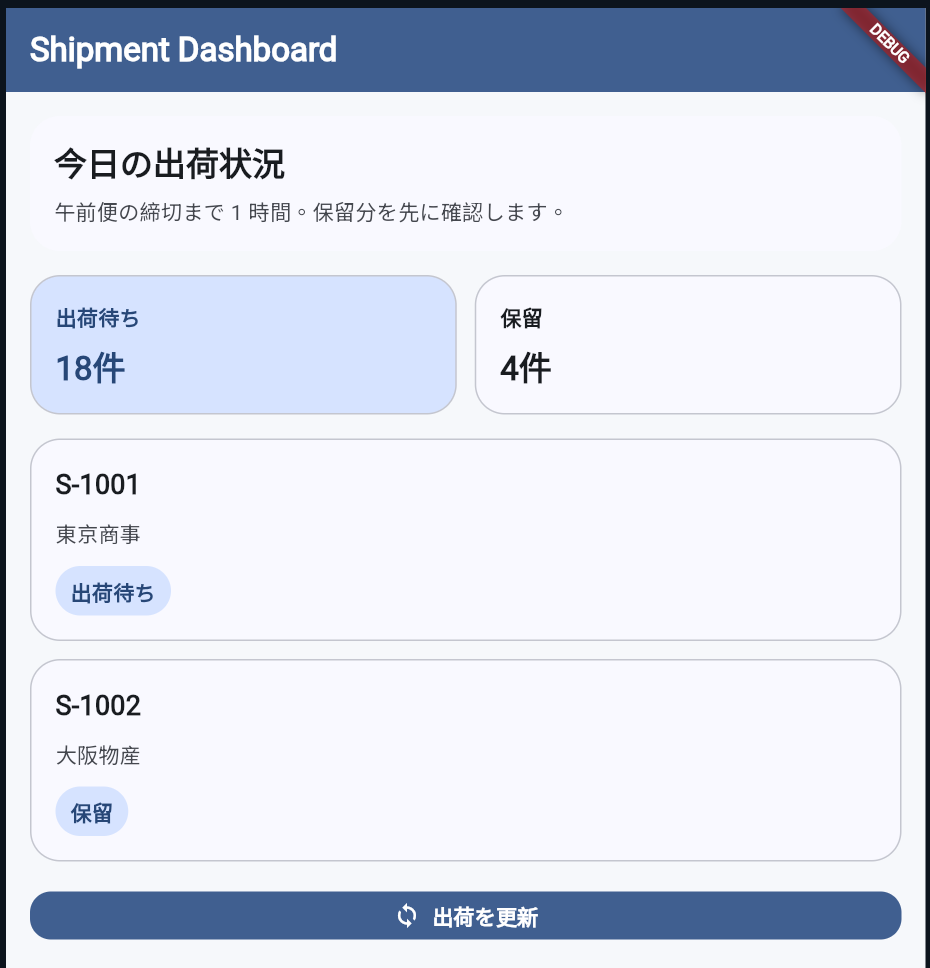
次は、Material 標準コンポーネントが読む値を ThemeData へ集めます。ここでは主色、本文色、見出し文字、ボタンスタイルを ThemeData へ寄せ、Widget 側は Theme.of(context) から読む形にそろえます。
lib/main.dart を次の内容へ書き換えます。
このファイルは、Material 標準コンポーネントが読む値を ThemeData へ寄せた版です。注目点は、色や文字サイズの定義を buildAppTheme() に集約し、Widget 側では Theme.of(context) から読む形へ揃えていることです。
import 'package:flutter/material.dart';

void main() {
  runApp(const MyApp());
}

class MyApp extends StatelessWidget {
  const MyApp({super.key});

  @override
  Widget build(BuildContext context) {
    return MaterialApp(
      theme: buildAppTheme(),
      home: const DashboardPage(),
    );
  }
}

ThemeData buildAppTheme() {
  final colorScheme = ColorScheme.fromSeed(
    seedColor: const Color(0xFF1565C0),
  );

  return ThemeData(
    useMaterial3: true,
    colorScheme: colorScheme,
    scaffoldBackgroundColor: const Color(0xFFF6F8FB),
    textTheme: const TextTheme(
      titleLarge: TextStyle(fontSize: 22, fontWeight: FontWeight.w700),
      titleMedium: TextStyle(fontSize: 18, fontWeight: FontWeight.w600),
      bodyMedium: TextStyle(fontSize: 14, height: 1.5),
      labelLarge: TextStyle(fontWeight: FontWeight.w600),
    ),
    appBarTheme: AppBarTheme(
      backgroundColor: colorScheme.primary,
      foregroundColor: colorScheme.onPrimary,
      centerTitle: false,
    ),
    filledButtonTheme: FilledButtonThemeData(
      style: FilledButton.styleFrom(
        padding: const EdgeInsets.symmetric(horizontal: 16, vertical: 12),
        shape: RoundedRectangleBorder(borderRadius: BorderRadius.circular(14)),
      ),
    ),
  );
}

class DashboardPage extends StatelessWidget {
  const DashboardPage({super.key});

  @override
  Widget build(BuildContext context) {
    final theme = Theme.of(context);
    final scheme = theme.colorScheme;
    final textTheme = theme.textTheme;

    return Scaffold(
      appBar: AppBar(title: const Text('Shipment Dashboard')),
      body: ListView(
        padding: const EdgeInsets.all(16),
        children: [
          Container(
            padding: const EdgeInsets.all(16),
            decoration: BoxDecoration(
              color: scheme.surface,
              borderRadius: BorderRadius.circular(20),
            ),
            child: Column(
              crossAxisAlignment: CrossAxisAlignment.start,
              children: [
                Text('今日の出荷状況', style: textTheme.titleLarge),
                const SizedBox(height: 8),
                Text(
                  '午前便の締切まで 1 時間。保留分を先に確認します。',
                  style: textTheme.bodyMedium?.copyWith(
                    color: scheme.onSurfaceVariant,
                  ),
                ),
              ],
            ),
          ),
          const SizedBox(height: 16),
          Row(
            children: const [
              Expanded(
                child: SummaryCard(
                  label: '出荷待ち',
                  value: '18件',
                  emphasized: true,
                ),
              ),
              SizedBox(width: 12),
              Expanded(
                child: SummaryCard(
                  label: '保留',
                  value: '4件',
                ),
              ),
            ],
          ),
          const SizedBox(height: 16),
          const ShipmentCard(
            shipmentNo: 'S-1001',
            customer: '東京商事',
            status: '出荷待ち',
          ),
          const SizedBox(height: 12),
          const ShipmentCard(
            shipmentNo: 'S-1002',
            customer: '大阪物産',
            status: '保留',
          ),
          const SizedBox(height: 20),
          FilledButton.icon(
            onPressed: () {},
            icon: const Icon(Icons.sync),
            label: const Text('出荷を更新'),
          ),
        ],
      ),
    );
  }
}

class SummaryCard extends StatelessWidget {
  const SummaryCard({
    super.key,
    required this.label,
    required this.value,
    this.emphasized = false,
  });

  final String label;
  final String value;
  final bool emphasized;

  @override
  Widget build(BuildContext context) {
    final theme = Theme.of(context);
    final scheme = theme.colorScheme;
    final backgroundColor = emphasized ? scheme.primaryContainer : scheme.surface;
    final foregroundColor = emphasized
        ? scheme.onPrimaryContainer
        : scheme.onSurface;

    return Container(
      padding: const EdgeInsets.all(16),
      decoration: BoxDecoration(
        color: backgroundColor,
        borderRadius: BorderRadius.circular(20),
        border: Border.all(color: scheme.outlineVariant),
      ),
      child: Column(
        crossAxisAlignment: CrossAxisAlignment.start,
        children: [
          Text(
            label,
            style: theme.textTheme.bodyMedium?.copyWith(
              color: foregroundColor,
              fontWeight: FontWeight.w600,
            ),
          ),
          const SizedBox(height: 8),
          Text(
            value,
            style: theme.textTheme.titleLarge?.copyWith(color: foregroundColor),
          ),
        ],
      ),
    );
  }
}

class ShipmentCard extends StatelessWidget {
  const ShipmentCard({
    super.key,
    required this.shipmentNo,
    required this.customer,
    required this.status,
  });

  final String shipmentNo;
  final String customer;
  final String status;

  @override
  Widget build(BuildContext context) {
    final theme = Theme.of(context);
    final scheme = theme.colorScheme;

    return Container(
      padding: const EdgeInsets.all(16),
      decoration: BoxDecoration(
        color: scheme.surface,
        borderRadius: BorderRadius.circular(20),
        border: Border.all(color: scheme.outlineVariant),
      ),
      child: Column(
        crossAxisAlignment: CrossAxisAlignment.start,
        children: [
          Text(shipmentNo, style: theme.textTheme.titleMedium),
          const SizedBox(height: 8),
          Text(
            customer,
            style: theme.textTheme.bodyMedium?.copyWith(
              color: scheme.onSurfaceVariant,
            ),
          ),
          const SizedBox(height: 12),
          Container(
            padding: const EdgeInsets.symmetric(horizontal: 10, vertical: 6),
            decoration: BoxDecoration(
              color: scheme.primaryContainer,
              borderRadius: BorderRadius.circular(999),
            ),
            child: Text(
              status,
              style: theme.textTheme.bodyMedium?.copyWith(
                color: scheme.onPrimaryContainer,
                fontWeight: FontWeight.w700,
              ),
            ),
          ),
        ],
      ),
    );
  }
}
コードのポイント
① buildAppTheme() へ標準トークンを集約している
ThemeData buildAppTheme() {
  final colorScheme = ColorScheme.fromSeed(
    seedColor: const Color(0xFF1565C0),
  );

  return ThemeData(
    useMaterial3: true,
    colorScheme: colorScheme,
    scaffoldBackgroundColor: const Color(0xFFF6F8FB),
    textTheme: const TextTheme(
主色、面の色、本文、見出しといった Material 標準コンポーネントが読む値を ThemeData 側へ寄せています。こうしておくと、色や文字サイズの変更を画面ごとの直書きから切り離しやすくなります。
② Widget 側は Theme.of(context) から用途別に読む
  Widget build(BuildContext context) {
    final theme = Theme.of(context);
    final scheme = theme.colorScheme;
    final textTheme = theme.textTheme;
Widget 側では値そのものではなく、theme.colorScheme や theme.textTheme のような役割名を読むだけにしています。ThemeData が効きやすいのは AppBar やボタン、本文文字のように Material 標準で意味が決まっている範囲で、ここへ寄せると読み方も揃えられます。
5. ThemeExtension で業務固有トークンを足す
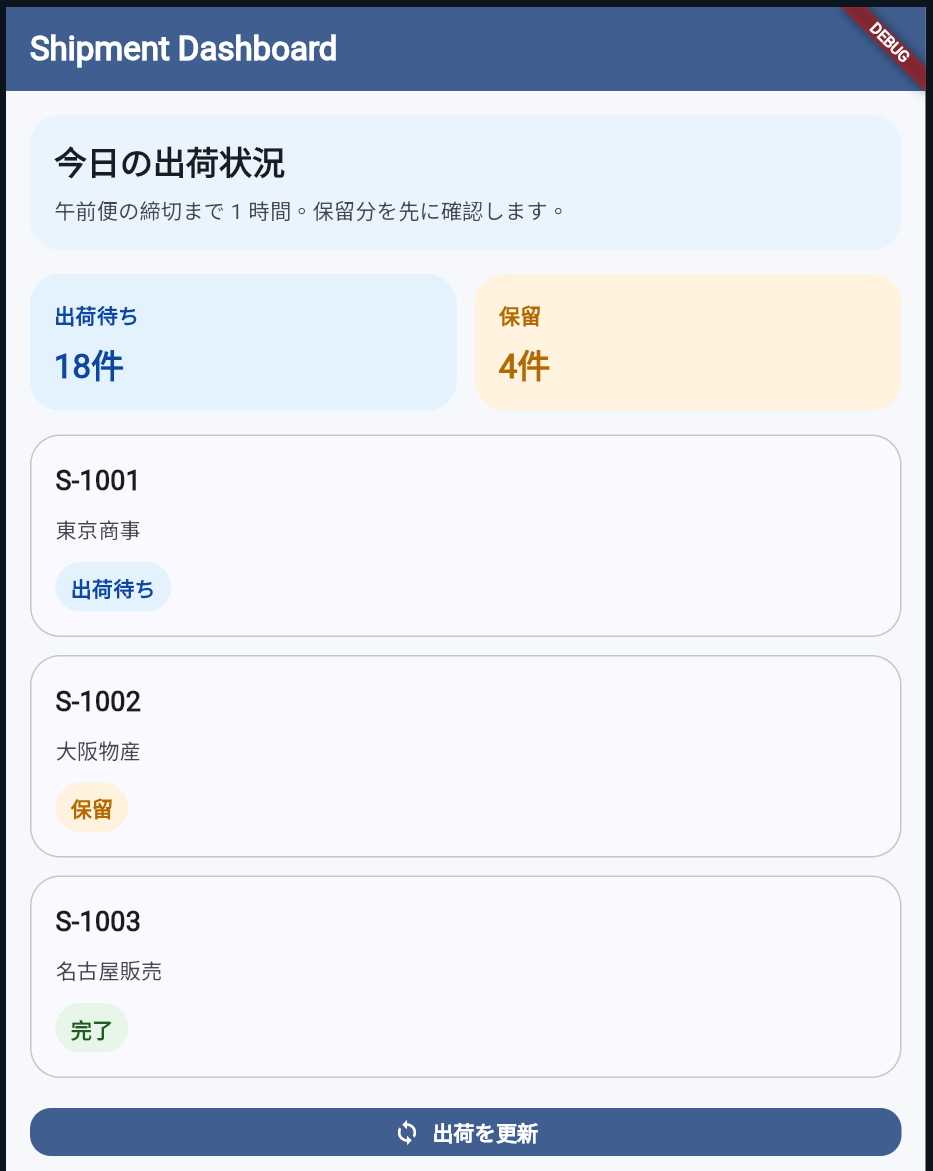
次は、ThemeData だけでは名前を付けにくい値を ThemeExtension へ切り出します。ここでは、受注ステータスの背景色と文字色を ShipmentPalette として持ちます。
lib/main.dart を次の内容へ書き換えます。
このファイルは、業務固有のステータス色を ThemeExtension へ切り出した版です。注目点は、ShipmentPalette を ThemeData.extensions へ登録し、Widget 側では色名ではなく用途名で参照していることです。
import 'package:flutter/material.dart';

void main() {
  runApp(const MyApp());
}

class MyApp extends StatelessWidget {
  const MyApp({super.key});

  @override
  Widget build(BuildContext context) {
    return MaterialApp(
      theme: buildAppTheme(),
      home: const DashboardPage(),
    );
  }
}

ThemeData buildAppTheme() {
  final colorScheme = ColorScheme.fromSeed(
    seedColor: const Color(0xFF1565C0),
  );

  return ThemeData(
    useMaterial3: true,
    colorScheme: colorScheme,
    scaffoldBackgroundColor: const Color(0xFFF6F8FB),
    textTheme: const TextTheme(
      titleLarge: TextStyle(fontSize: 22, fontWeight: FontWeight.w700),
      titleMedium: TextStyle(fontSize: 18, fontWeight: FontWeight.w600),
      bodyMedium: TextStyle(fontSize: 14, height: 1.5),
      labelLarge: TextStyle(fontWeight: FontWeight.w600),
    ),
    appBarTheme: AppBarTheme(
      backgroundColor: colorScheme.primary,
      foregroundColor: colorScheme.onPrimary,
      centerTitle: false,
    ),
    filledButtonTheme: FilledButtonThemeData(
      style: FilledButton.styleFrom(
        padding: const EdgeInsets.symmetric(horizontal: 16, vertical: 12),
        shape: RoundedRectangleBorder(borderRadius: BorderRadius.circular(14)),
      ),
    ),
    extensions: const [
      ShipmentPalette(
        waitingBackground: Color(0xFFE3F2FD),
        waitingForeground: Color(0xFF0D47A1),
        holdBackground: Color(0xFFFFF3E0),
        holdForeground: Color(0xFFB26A00),
        completedBackground: Color(0xFFE8F5E9),
        completedForeground: Color(0xFF1B5E20),
        dashboardNoticeBackground: Color(0xFFEAF4FF),
      ),
    ],
  );
}

@immutable
class ShipmentPalette extends ThemeExtension<ShipmentPalette> {
  const ShipmentPalette({
    required this.waitingBackground,
    required this.waitingForeground,
    required this.holdBackground,
    required this.holdForeground,
    required this.completedBackground,
    required this.completedForeground,
    required this.dashboardNoticeBackground,
  });

  final Color waitingBackground;
  final Color waitingForeground;
  final Color holdBackground;
  final Color holdForeground;
  final Color completedBackground;
  final Color completedForeground;
  final Color dashboardNoticeBackground;

  @override
  ShipmentPalette copyWith({
    Color? waitingBackground,
    Color? waitingForeground,
    Color? holdBackground,
    Color? holdForeground,
    Color? completedBackground,
    Color? completedForeground,
    Color? dashboardNoticeBackground,
  }) {
    return ShipmentPalette(
      waitingBackground: waitingBackground ?? this.waitingBackground,
      waitingForeground: waitingForeground ?? this.waitingForeground,
      holdBackground: holdBackground ?? this.holdBackground,
      holdForeground: holdForeground ?? this.holdForeground,
      completedBackground: completedBackground ?? this.completedBackground,
      completedForeground: completedForeground ?? this.completedForeground,
      dashboardNoticeBackground:
          dashboardNoticeBackground ?? this.dashboardNoticeBackground,
    );
  }

  @override
  ShipmentPalette lerp(covariant ShipmentPalette? other, double t) {
    if (other == null) {
      return this;
    }

    return ShipmentPalette(
      waitingBackground:
          Color.lerp(waitingBackground, other.waitingBackground, t)!,
      waitingForeground:
          Color.lerp(waitingForeground, other.waitingForeground, t)!,
      holdBackground: Color.lerp(holdBackground, other.holdBackground, t)!,
      holdForeground: Color.lerp(holdForeground, other.holdForeground, t)!,
      completedBackground:
          Color.lerp(completedBackground, other.completedBackground, t)!,
      completedForeground:
          Color.lerp(completedForeground, other.completedForeground, t)!,
      dashboardNoticeBackground: Color.lerp(
        dashboardNoticeBackground,
        other.dashboardNoticeBackground,
        t,
      )!,
    );
  }
}

ShipmentPalette paletteOf(BuildContext context) {
  final palette = Theme.of(context).extension<ShipmentPalette>();
  assert(palette != null, 'ShipmentPalette is not found in ThemeData.extensions.');
  return palette!;
}

class DashboardPage extends StatelessWidget {
  const DashboardPage({super.key});

  @override
  Widget build(BuildContext context) {
    final theme = Theme.of(context);
    final scheme = theme.colorScheme;
    final palette = paletteOf(context);

    return Scaffold(
      appBar: AppBar(title: const Text('Shipment Dashboard')),
      body: ListView(
        padding: const EdgeInsets.all(16),
        children: [
          Container(
            padding: const EdgeInsets.all(16),
            decoration: BoxDecoration(
              color: palette.dashboardNoticeBackground,
              borderRadius: BorderRadius.circular(20),
            ),
            child: Column(
              crossAxisAlignment: CrossAxisAlignment.start,
              children: [
                Text('今日の出荷状況', style: theme.textTheme.titleLarge),
                const SizedBox(height: 8),
                Text(
                  '午前便の締切まで 1 時間。保留分を先に確認します。',
                  style: theme.textTheme.bodyMedium?.copyWith(
                    color: scheme.onSurfaceVariant,
                  ),
                ),
              ],
            ),
          ),
          const SizedBox(height: 16),
          const Row(
            children: [
              Expanded(
                child: SummaryCard(
                  label: '出荷待ち',
                  value: '18件',
                  status: ShipmentStatus.waiting,
                ),
              ),
              SizedBox(width: 12),
              Expanded(
                child: SummaryCard(
                  label: '保留',
                  value: '4件',
                  status: ShipmentStatus.onHold,
                ),
              ),
            ],
          ),
          const SizedBox(height: 16),
          const ShipmentCard(
            shipmentNo: 'S-1001',
            customer: '東京商事',
            status: ShipmentStatus.waiting,
          ),
          const SizedBox(height: 12),
          const ShipmentCard(
            shipmentNo: 'S-1002',
            customer: '大阪物産',
            status: ShipmentStatus.onHold,
          ),
          const SizedBox(height: 12),
          const ShipmentCard(
            shipmentNo: 'S-1003',
            customer: '名古屋販売',
            status: ShipmentStatus.completed,
          ),
          const SizedBox(height: 20),
          FilledButton.icon(
            onPressed: () {},
            icon: const Icon(Icons.sync),
            label: const Text('出荷を更新'),
          ),
        ],
      ),
    );
  }
}

enum ShipmentStatus { waiting, onHold, completed }

class SummaryCard extends StatelessWidget {
  const SummaryCard({
    super.key,
    required this.label,
    required this.value,
    required this.status,
  });

  final String label;
  final String value;
  final ShipmentStatus status;

  @override
  Widget build(BuildContext context) {
    final theme = Theme.of(context);
    final statusStyle = statusStyleOf(context, status);

    return Container(
      padding: const EdgeInsets.all(16),
      decoration: BoxDecoration(
        color: statusStyle.backgroundColor,
        borderRadius: BorderRadius.circular(20),
      ),
      child: Column(
        crossAxisAlignment: CrossAxisAlignment.start,
        children: [
          Text(
            label,
            style: theme.textTheme.bodyMedium?.copyWith(
              color: statusStyle.foregroundColor,
              fontWeight: FontWeight.w600,
            ),
          ),
          const SizedBox(height: 8),
          Text(
            value,
            style: theme.textTheme.titleLarge?.copyWith(
              color: statusStyle.foregroundColor,
            ),
          ),
        ],
      ),
    );
  }
}

class ShipmentCard extends StatelessWidget {
  const ShipmentCard({
    super.key,
    required this.shipmentNo,
    required this.customer,
    required this.status,
  });

  final String shipmentNo;
  final String customer;
  final ShipmentStatus status;

  @override
  Widget build(BuildContext context) {
    final theme = Theme.of(context);
    final scheme = theme.colorScheme;

    return Container(
      padding: const EdgeInsets.all(16),
      decoration: BoxDecoration(
        color: scheme.surface,
        borderRadius: BorderRadius.circular(20),
        border: Border.all(color: scheme.outlineVariant),
      ),
      child: Column(
        crossAxisAlignment: CrossAxisAlignment.start,
        children: [
          Text(shipmentNo, style: theme.textTheme.titleMedium),
          const SizedBox(height: 8),
          Text(
            customer,
            style: theme.textTheme.bodyMedium?.copyWith(
              color: scheme.onSurfaceVariant,
            ),
          ),
          const SizedBox(height: 12),
          StatusChip(status: status),
        ],
      ),
    );
  }
}

class StatusChip extends StatelessWidget {
  const StatusChip({super.key, required this.status});

  final ShipmentStatus status;

  @override
  Widget build(BuildContext context) {
    final theme = Theme.of(context);
    final statusStyle = statusStyleOf(context, status);

    return Container(
      padding: const EdgeInsets.symmetric(horizontal: 10, vertical: 6),
      decoration: BoxDecoration(
        color: statusStyle.backgroundColor,
        borderRadius: BorderRadius.circular(999),
      ),
      child: Text(
        statusStyle.label,
        style: theme.textTheme.bodyMedium?.copyWith(
          color: statusStyle.foregroundColor,
          fontWeight: FontWeight.w700,
        ),
      ),
    );
  }
}

StatusStyle statusStyleOf(BuildContext context, ShipmentStatus status) {
  final palette = paletteOf(context);

  switch (status) {
    case ShipmentStatus.waiting:
      return StatusStyle(
        label: '出荷待ち',
        backgroundColor: palette.waitingBackground,
        foregroundColor: palette.waitingForeground,
      );
    case ShipmentStatus.onHold:
      return StatusStyle(
        label: '保留',
        backgroundColor: palette.holdBackground,
        foregroundColor: palette.holdForeground,
      );
    case ShipmentStatus.completed:
      return StatusStyle(
        label: '完了',
        backgroundColor: palette.completedBackground,
        foregroundColor: palette.completedForeground,
      );
  }
}

class StatusStyle {
  const StatusStyle({
    required this.label,
    required this.backgroundColor,
    required this.foregroundColor,
  });

  final String label;
  final Color backgroundColor;
  final Color foregroundColor;
}
コードのポイント
① ThemeData.extensions に業務固有トークンを登録する
    extensions: const [
      ShipmentPalette(
        waitingBackground: Color(0xFFE3F2FD),
        waitingForeground: Color(0xFF0D47A1),
        holdBackground: Color(0xFFFFF3E0),
        holdForeground: Color(0xFFB26A00),
ShipmentPalette は ColorScheme の役割名では説明しにくい、業務固有の色をまとめるための置き場です。waitingBackground のように用途名で持てるため、後から色を変えても参照側の Widget を探し回らずに済みます。
② Widget 側は用途ベースの API を読むだけでよい
StatusStyle statusStyleOf(BuildContext context, ShipmentStatus status) {
  final palette = paletteOf(context);

  switch (status) {
    case ShipmentStatus.waiting:
      return StatusStyle(
        label: '出荷待ち',
        backgroundColor: palette.waitingBackground,
Widget 側は statusStyleOf(context, status) のような用途ベースの関数を読むだけで、個別の色値を知らなくて済みます。ここで ColorScheme に無理やり primaryContainer などを流用すると Material 標準の意味と業務上の意味が混ざりやすいため、アプリ固有の語彙で呼びたい値は ThemeExtension へ出したほうが長期的に追いやすい設計です。
6. 迷ったときの判断基準を 4 つに絞る
| 判断基準 | 置き場 | 例 |
|---|---|---|
| Material 標準コンポーネントの見た目をそろえたい | ThemeData | AppBar、本文文字、ボタン、全体の主色 |
| アプリ独自の用途名で再利用したい | ThemeExtension | 出荷待ち色、保留色、管理画面専用パネル色 |
| その場でしか使わない小さな値 | 直書きでも可 | 一度しか出ない SizedBox(height: 12)、一時的な BorderRadius.circular(20) |
| 値より構造の問題が大きい | テーマ化より先に Widget 分割 | build が長い、責務が混ざる、同じ見た目が複数箇所にある |
詰まりやすい点も先に整理しておきます。
- 何でも
ThemeDataに入れようとしない。意味名が Material 標準とずれるならThemeExtensionのほうが読みやすい - 逆に、AppBar やボタンの見た目まで
ThemeExtensionに逃がさない。標準コンポーネントが読む仕組みを捨てることになる - 小さな値まで全部トークン化しない。用途名で再利用する値だけをテーマへ寄せる
- テーマ化しても
buildが長い問題は別に残る。そこは Flutterでカスタムウィジェットを作る入門(StatelessWidget の分割と再利用) の領域です
7. まとめ
ThemeData は Material 標準コンポーネントの共通ルールをそろえる置き場で、ThemeExtension は業務固有の見た目を用途名で持つ置き場です。最初にこの線引きを持っておくと、画面追加のたびに色や文字サイズの置き場がぶれにくくなります。
次は FlutterのContainerとSizedBoxを使いこなす(余白・サイズ・装飾の基本) へ進むと、テーマでそろえる値と、Widget 側で持つ余白や装飾の責務をさらに分けやすくなります。