Flutterでスキャン入力を受けて処理する の次は、受け取った文字列をそのまま保存するのではなく、意味のある項目へ分解する段階です。この記事では外部パッケージを使わず、GS1-128 で使うアプリケーション識別子(AI)のうち、例として (01) GTIN、(17) 有効期限、(310x) 正味重量、(21) シリアル番号、(22) 商品バリアント を Flutter だけで解析し、括弧あり / なし両対応、日付変換、重量変換、必須項目不足時のエラー表示までを 1 画面で確認します。
1. ゴールと非対象
対象読者
- Flutter プロジェクトを作成して
flutter runした経験がある人 - Flutterでスキャン入力を受けて処理する の次に、GS1-128 の文字列を構造化データへ変換したい人
- まずは
(01)(17)(310x)(21)(22)の 5 要素に絞って流れをつかみたい人
この記事で到達する状態
- 括弧付き表記と、括弧なしのスキャン文字列をどちらも解析できる
(17)のYYMMDDを日付として扱える(310x)の小数点位置を AI 末尾から読み、重量へ変換できる- 必須項目
(01)(17)(310x)が不足した場合に、理由付きでエラー表示できる - UI 側で「元の文字列」「サニタイズ後」「分解結果」を見比べられる
非対象
- GS1 仕様全体、他 AI の網羅的な解説
- カメラプラグインや MethodChannel による読み取り
- API 送信、ローカルファイル保存、画像添付
- Riverpod などの状態管理ライブラリ
今回は「受け取った文字列を構造化データへ変換する」ところに絞ります。入力の受け方は前の記事で固めたので、次は保存しやすい形へ分解するところを整理します。
2. 先に読み方のルールを整理する
今回扱うアプリケーション識別子(AI)は次の 5 つです。
GS1-128 はバーコードの表現方式で、01 や 17 は中身の意味を表す AI です。GS1-128 で必ずこの 5 つを使うわけではなく、この記事では流れをつかみやすい組み合わせに絞って扱います。
| AI | 意味 | 長さ | 例 | 変換結果 |
|---|---|---|---|---|
01 | GTIN | 固定 14 桁 | 04912345678903 | 14 桁の商品コード |
17 | 有効期限 | 固定 6 桁 | 260101 | 2026-01-01 |
310x | 正味重量 kg | AI 4 桁 + 値 6 桁 | 3103 + 001750 | 1.750 kg |
21 | シリアル番号 | 可変長 最大 20 文字 | ABC12345 | 文字列のまま保持 |
22 | 商品バリアント | 可変長 最大 29 文字 | LOT-77 | 文字列のまま保持 |
ここで先に押さえたいのは、01 17 310x は固定長、21 22 は可変長だという点です。括弧付き表記では区切りが見えるので切り出しやすい一方、実際のスキャン文字列は括弧がなく、可変長 AI が途中に入る場合は GS 区切りが必要になります。括弧は人が読みやすくするための表記で、スキャン文字列そのものには含まれません。
flowchart TD
  A[入力文字列を受ける] --> B[改行と制御文字を除去]
  B --> C{括弧あり?}
  C -->|Yes| D[AIと値を順に切り出す]
  C -->|No| E[固定長AIと可変長AIを順に読む]
  E --> F{可変長AIが途中にある?}
  F -->|Yes| G[GS区切りまでを値として読む]
  F -->|No| H[末尾までを値として読む]
  D --> I[日付と重量を変換]
  G --> I
  H --> I
  I --> J{01 17 310x が揃う?}
  J -->|Yes| K[結果を画面表示]
J -->|No| L[不足理由をエラー表示]実務でつまずきやすいのは「括弧なしでも何となく切れそう」と思ってしまうところです。21 や 22 のような可変長 AI が途中にある場合、GS がないと次の AI の開始位置を安全に決められません。この記事のサンプルも、その前提をそのままコードへ落とします。
3. プロジェクトを作成し、確認環境を用意する
3-1. Flutter の環境構築がまだなら先に済ませる
環境構築がまだの場合は Windows 11で始めるFlutter開発環境 を先に参照してください。
このサンプルは flutter run で確認できます。外部パッケージ不要なので、コードそのものは DartPad でも試せます。GS 区切り入りサンプルの見え方や貼り付け確認は flutter run のほうが追いやすいです。
3-2. Flutter プロジェクトを作成する
次のコマンドでプロジェクトを作成します。
flutter create my_gs1_parser_app
cd my_gs1_parser_app
3-3. エミュレーターを起動する
利用可能なエミュレーター一覧を確認します。
flutter emulators表示された ID を指定して起動します。
flutter emulators --launch <emulator_id>今回は外部パッケージがないので、ここまで済めばそのまま lib/main.dart を貼り付けて動かせます。
4. lib/main.dart に GS1-128 パーサを実装する
lib/main.dart は次の内容で作成します。
このファイルは、入力欄、サンプル文字列、括弧あり / なし両対応のパース、日付変換、重量変換、必須項目不足エラー表示までを 1 画面で確認するサンプルです。注目点は、Gs1Parser に解析ロジックを寄せ、画面側では「何を入れたら何が返るか」を見比べやすくしているところにあります。
import 'package:flutter/material.dart';

void main() {
  runApp(const MyApp());
}

class MyApp extends StatelessWidget {
  const MyApp({super.key});

  @override
  Widget build(BuildContext context) {
    return MaterialApp(
      title: 'GS1-128 Parser Demo',
      theme: ThemeData(
        colorScheme: ColorScheme.fromSeed(seedColor: Colors.indigo),
      ),
      home: const Gs1ParserPage(),
    );
  }
}

class ParsedElement {
  const ParsedElement({required this.ai, required this.value});

  final String ai;
  final String value;
}

class ParsedGs1Data {
  const ParsedGs1Data({
    required this.gtin,
    required this.expiryDate,
    required this.netWeightKg,
    required this.serialNumber,
    required this.variant,
    required this.elements,
  });

  final String gtin;
  final DateTime expiryDate;
  final double netWeightKg;
  final String? serialNumber;
  final String? variant;
  final List<ParsedElement> elements;
}

class Gs1ParseException implements Exception {
  const Gs1ParseException(this.message);

  final String message;

  @override
  String toString() => message;
}

class Gs1Parser {
  static const String groupSeparator = '\u001D';

  static String sanitizeForParsing(String input) {
    return input
        .replaceAll('\r', '')
        .replaceAll('\n', '')
        .replaceAll(RegExp(r'[\u0000-\u001C\u001E-\u001F\u007F]'), '')
        .trim();
  }

  static String displayForUi(String input) {
    if (input.isEmpty) {
      return '-';
    }

    return input.replaceAll(groupSeparator, '<GS>');
  }

  static ParsedGs1Data parse(String input) {
    final String sanitized = sanitizeForParsing(input);
    if (sanitized.isEmpty) {
      throw const Gs1ParseException('入力が空です。GS1-128 文字列を貼り付けてください。');
    }

    final List<ParsedElement> elements = sanitized.contains('(')
        ? _parseBracketedElements(sanitized)
        : _parseRawElements(sanitized);

    return _toParsedData(elements);
  }

  static List<ParsedElement> _parseBracketedElements(String input) {
    final List<ParsedElement> elements = <ParsedElement>[];
    int index = 0;

    while (index < input.length) {
      if (input[index] != '(') {
        throw Gs1ParseException('括弧付き形式として読めません。位置 ${index + 1} を確認してください。');
      }

      final int closeIndex = input.indexOf(')', index + 1);
      if (closeIndex == -1) {
        throw const Gs1ParseException('AI の閉じ括弧が見つかりません。');
      }

      final String ai = input.substring(index + 1, closeIndex);
      if (!_isSupportedAi(ai)) {
        throw Gs1ParseException('対応していない AI ($ai) が見つかりました。');
      }

      final int dataStart = closeIndex + 1;
      final int? fixedLength = _fixedLengthForAi(ai);
      late final String rawValue;

      if (fixedLength != null) {
        if (dataStart + fixedLength > input.length) {
          throw Gs1ParseException('AI ($ai) の値が途中で切れています。');
        }
        rawValue = input.substring(dataStart, dataStart + fixedLength);
        index = dataStart + fixedLength;
      } else {
        int nextIndex = input.indexOf('(', dataStart);
        if (nextIndex == -1) {
          nextIndex = input.length;
        }
        rawValue = input.substring(dataStart, nextIndex).replaceAll(groupSeparator, '');
        index = nextIndex;
      }

      if (rawValue.isEmpty) {
        throw Gs1ParseException('AI ($ai) の値が空です。');
      }

      elements.add(ParsedElement(ai: ai, value: rawValue));
    }

    return elements;
  }

  static List<ParsedElement> _parseRawElements(String input) {
    final List<ParsedElement> elements = <ParsedElement>[];
    int index = 0;

    while (index < input.length) {
      if (input.startsWith(groupSeparator, index)) {
        index += groupSeparator.length;
        continue;
      }

      final String ai = _readAi(input, index);
      index += ai.length;

      final int? fixedLength = _fixedLengthForAi(ai);
      if (fixedLength != null) {
        if (index + fixedLength > input.length) {
          throw Gs1ParseException('AI ($ai) の値が途中で切れています。');
        }

        final String rawValue = input.substring(index, index + fixedLength);
        elements.add(ParsedElement(ai: ai, value: rawValue));
        index += fixedLength;
        continue;
      }

      final int start = index;
      while (index < input.length && !input.startsWith(groupSeparator, index)) {
        index++;
      }

      final String rawValue = input.substring(start, index);
      if (rawValue.isEmpty) {
        throw Gs1ParseException('AI ($ai) の値が空です。');
      }

      elements.add(ParsedElement(ai: ai, value: rawValue));
    }

    return elements;
  }

  static String _readAi(String input, int index) {
    if (index + 2 <= input.length) {
      final String twoDigits = input.substring(index, index + 2);
      if (twoDigits == '01' ||
          twoDigits == '17' ||
          twoDigits == '21' ||
          twoDigits == '22') {
        return twoDigits;
      }
    }

    if (index + 4 <= input.length) {
      final String fourDigits = input.substring(index, index + 4);
      if (_is310Ai(fourDigits)) {
        return fourDigits;
      }
    }

    throw Gs1ParseException('対応していない AI が位置 ${index + 1} 付近にあります。');
  }

  static ParsedGs1Data _toParsedData(List<ParsedElement> elements) {
    final Map<String, String> fields = <String, String>{};
    ParsedElement? weightElement;

    for (final ParsedElement element in elements) {
      if (_is310Ai(element.ai)) {
        weightElement ??= element;
        continue;
      }

      fields[element.ai] = element.value;
    }

    final List<String> missing = <String>[];
    if (!fields.containsKey('01')) {
      missing.add('(01) GTIN');
    }
    if (!fields.containsKey('17')) {
      missing.add('(17) 有効期限');
    }
    if (weightElement == null) {
      missing.add('(310x) 正味重量');
    }

    if (missing.isNotEmpty) {
      throw Gs1ParseException('必須項目が不足しています: ${missing.join(' / ')}');
    }

    return ParsedGs1Data(
      gtin: _parseGtin(fields['01']!),
      expiryDate: _parseExpiryDate(fields['17']!),
      netWeightKg: _parseNetWeight(weightElement!),
      serialNumber: _optional(fields['21']),
      variant: _optional(fields['22']),
      elements: elements,
    );
  }

  static String _parseGtin(String value) {
    if (!RegExp(r'^\d{14}$').hasMatch(value)) {
      throw Gs1ParseException('(01) GTIN は 14 桁の数字である必要があります。現在値: $value');
    }

    return value;
  }

  static DateTime _parseExpiryDate(String value) {
    if (!RegExp(r'^\d{6}$').hasMatch(value)) {
      throw Gs1ParseException('(17) 有効期限は YYMMDD の 6 桁である必要があります。現在値: $value');
    }

    final int yy = int.parse(value.substring(0, 2));
    final int mm = int.parse(value.substring(2, 4));
    final int dd = int.parse(value.substring(4, 6));
    final DateTime date = DateTime.utc(2000 + yy, mm, dd);

    if (date.month != mm || date.day != dd) {
      throw Gs1ParseException('(17) の日付が不正です。現在値: $value');
    }

    return date;
  }

  static double _parseNetWeight(ParsedElement element) {
    if (!RegExp(r'^\d{6}$').hasMatch(element.value)) {
      throw Gs1ParseException('(${element.ai}) の重量値は 6 桁の数字である必要があります。現在値: ${element.value}');
    }

    final int decimalPlaces = int.parse(element.ai.substring(3));
    final int divisor = _pow10(decimalPlaces);
    return int.parse(element.value) / divisor;
  }

  static String? _optional(String? value) {
    if (value == null || value.isEmpty) {
      return null;
    }

    return value;
  }

  static bool _isSupportedAi(String ai) {
    return ai == '01' || ai == '17' || ai == '21' || ai == '22' || _is310Ai(ai);
  }

  static bool _is310Ai(String ai) {
    return RegExp(r'^310\d$').hasMatch(ai);
  }

  static int? _fixedLengthForAi(String ai) {
    if (ai == '01') {
      return 14;
    }
    if (ai == '17') {
      return 6;
    }
    if (_is310Ai(ai)) {
      return 6;
    }

    return null;
  }

  static int _pow10(int count) {
    int value = 1;
    for (int i = 0; i < count; i++) {
      value *= 10;
    }
    return value;
  }
}

class Gs1ParserPage extends StatefulWidget {
  const Gs1ParserPage({super.key});

  @override
  State<Gs1ParserPage> createState() => _Gs1ParserPageState();
}

class _Gs1ParserPageState extends State<Gs1ParserPage> {
  static const String _sampleWithParentheses =
      '(01)04912345678903(17)260101(3103)001750(21)ABC12345(22)LOT-77';

  static const String _sampleWithoutParentheses =
      '010491234567890317260101310300175021ABC12345\u001D22LOT-77';

  static const String _sampleMissingRequired =
      '(01)04912345678903(21)ABC12345';

  final TextEditingController _controller = TextEditingController();

  ParsedGs1Data? _parsedData;
  String _sanitizedInput = '-';
  String? _errorMessage;

  @override
  void dispose() {
    _controller.dispose();
    super.dispose();
  }

  void _setSample(String value) {
    setState(() {
      _controller.text = value;
    });
  }

  void _clearAll() {
    setState(() {
      _controller.clear();
      _parsedData = null;
      _sanitizedInput = '-';
      _errorMessage = null;
    });
  }

  void _parseCurrentInput() {
    final String sanitized = Gs1Parser.sanitizeForParsing(_controller.text);

    setState(() {
      _sanitizedInput = Gs1Parser.displayForUi(sanitized);
    });

    try {
      final ParsedGs1Data parsed = Gs1Parser.parse(_controller.text);
      setState(() {
        _parsedData = parsed;
        _errorMessage = null;
      });
    } on Gs1ParseException catch (error) {
      setState(() {
        _parsedData = null;
        _errorMessage = error.message;
      });
    }
  }

  String _formatDate(DateTime value) {
    final String month = value.month.toString().padLeft(2, '0');
    final String day = value.day.toString().padLeft(2, '0');
    return '${value.year}-$month-$day';
  }

  Widget _buildResultRow(String label, String value) {
    return Padding(
      padding: const EdgeInsets.symmetric(vertical: 6),
      child: Row(
        crossAxisAlignment: CrossAxisAlignment.start,
        children: <Widget>[
          SizedBox(
            width: 116,
            child: Text(
              label,
              style: const TextStyle(fontWeight: FontWeight.bold),
            ),
          ),
          Expanded(
            child: SelectableText(value),
          ),
        ],
      ),
    );
  }

  @override
  Widget build(BuildContext context) {
    final ColorScheme colorScheme = Theme.of(context).colorScheme;

    return Scaffold(
      appBar: AppBar(
        title: const Text('GS1-128 パーサデモ'),
      ),
      body: SafeArea(
        child: ListView(
          padding: const EdgeInsets.all(16),
          children: <Widget>[
            Card(
              child: Padding(
                padding: const EdgeInsets.all(16),
                child: Column(
                  crossAxisAlignment: CrossAxisAlignment.start,
                  children: <Widget>[
                    const Text(
                      '入力',
                      style: TextStyle(fontSize: 18, fontWeight: FontWeight.bold),
                    ),
                    const SizedBox(height: 8),
                    const Text(
                      '括弧付き表記でも、括弧なし文字列でも確認できます。可変長 AI を途中に置く括弧なし文字列は <GS> 区切りで続けてください。',
                    ),
                    const SizedBox(height: 12),
                    TextField(
                      controller: _controller,
                      maxLines: 4,
                      decoration: const InputDecoration(
                        labelText: 'GS1-128 文字列',
                        hintText: '(01)04912345678903(17)260101(3103)001750(21)ABC12345',
                        border: OutlineInputBorder(),
                      ),
                    ),
                    const SizedBox(height: 12),
                    Wrap(
                      spacing: 8,
                      runSpacing: 8,
                      children: <Widget>[
                        FilledButton.icon(
                          onPressed: _parseCurrentInput,
                          icon: const Icon(Icons.play_arrow),
                          label: const Text('解析する'),
                        ),
                        OutlinedButton.icon(
                          onPressed: _clearAll,
                          icon: const Icon(Icons.clear),
                          label: const Text('クリア'),
                        ),
                      ],
                    ),
                    const SizedBox(height: 12),
                    Wrap(
                      spacing: 8,
                      runSpacing: 8,
                      children: <Widget>[
                        TextButton(
                          onPressed: () => _setSample(_sampleWithParentheses),
                          child: const Text('括弧ありサンプル'),
                        ),
                        TextButton(
                          onPressed: () => _setSample(_sampleWithoutParentheses),
                          child: const Text('括弧なし + GS サンプル'),
                        ),
                        TextButton(
                          onPressed: () => _setSample(_sampleMissingRequired),
                          child: const Text('必須不足サンプル'),
                        ),
                      ],
                    ),
                  ],
                ),
              ),
            ),
            const SizedBox(height: 16),
            Card(
              child: Padding(
                padding: const EdgeInsets.all(16),
                child: Column(
                  crossAxisAlignment: CrossAxisAlignment.start,
                  children: <Widget>[
                    const Text(
                      '解析前後の比較',
                      style: TextStyle(fontSize: 18, fontWeight: FontWeight.bold),
                    ),
                    const SizedBox(height: 8),
                    _buildResultRow('元入力', _controller.text.isEmpty ? '-' : _controller.text),
                    _buildResultRow('サニタイズ後', _sanitizedInput),
                  ],
                ),
              ),
            ),
            const SizedBox(height: 16),
            if (_errorMessage != null)
              Card(
                color: colorScheme.errorContainer,
                child: Padding(
                  padding: const EdgeInsets.all(16),
                  child: Column(
                    crossAxisAlignment: CrossAxisAlignment.start,
                    children: <Widget>[
                      Text(
                        'エラー',
                        style: TextStyle(
                          fontSize: 18,
                          fontWeight: FontWeight.bold,
                          color: colorScheme.onErrorContainer,
                        ),
                      ),
                      const SizedBox(height: 8),
                      Text(
                        _errorMessage!,
                        style: TextStyle(color: colorScheme.onErrorContainer),
                      ),
                    ],
                  ),
                ),
              )
            else if (_parsedData != null)
              Card(
                child: Padding(
                  padding: const EdgeInsets.all(16),
                  child: Column(
                    crossAxisAlignment: CrossAxisAlignment.start,
                    children: <Widget>[
                      const Text(
                        '解析結果',
                        style: TextStyle(fontSize: 18, fontWeight: FontWeight.bold),
                      ),
                      const SizedBox(height: 8),
                      _buildResultRow('GTIN', _parsedData!.gtin),
                      _buildResultRow('有効期限', _formatDate(_parsedData!.expiryDate)),
                      _buildResultRow('正味重量', '${_parsedData!.netWeightKg.toStringAsFixed(3)} kg'),
                      _buildResultRow('シリアル番号', _parsedData!.serialNumber ?? '-'),
                      _buildResultRow('バリアント', _parsedData!.variant ?? '-'),
                      const SizedBox(height: 12),
                      const Text(
                        '読み取った AI 一覧',
                        style: TextStyle(fontWeight: FontWeight.bold),
                      ),
                      const SizedBox(height: 8),
                      for (final ParsedElement element in _parsedData!.elements)
                        ListTile(
                          dense: true,
                          contentPadding: EdgeInsets.zero,
                          leading: CircleAvatar(
                            radius: 16,
                            child: Text(element.ai, style: const TextStyle(fontSize: 12)),
                          ),
                          title: SelectableText(element.value),
                        ),
                    ],
                  ),
                ),
              )
            else
              const Card(
                child: Padding(
                  padding: EdgeInsets.all(16),
                  child: Text('まだ解析結果がありません。サンプルを入れて「解析する」を押してください。'),
                ),
              ),
          ],
        ),
      ),
    );
  }
}
コードのポイント
① 括弧あり / なしを最初に分岐する
static ParsedGs1Data parse(String input) {
  final String sanitized = sanitizeForParsing(input);
  final List<ParsedElement> elements = sanitized.contains('(')
      ? _parseBracketedElements(sanitized)
      : _parseRawElements(sanitized);
  return _toParsedData(elements);
}
入力が括弧付きかどうかを先に切り分けると、後続のロジックを単純に保ちやすくなります。括弧付きは ( と ) を境界に読み、括弧なしは AI と長さルールで順に読み進めます。
② 310x は AI 末尾から小数点位置を決める
static double _parseNetWeight(ParsedElement element) {
  final int decimalPlaces = int.parse(element.ai.substring(3));
  final int divisor = _pow10(decimalPlaces);
  return int.parse(element.value) / divisor;
}
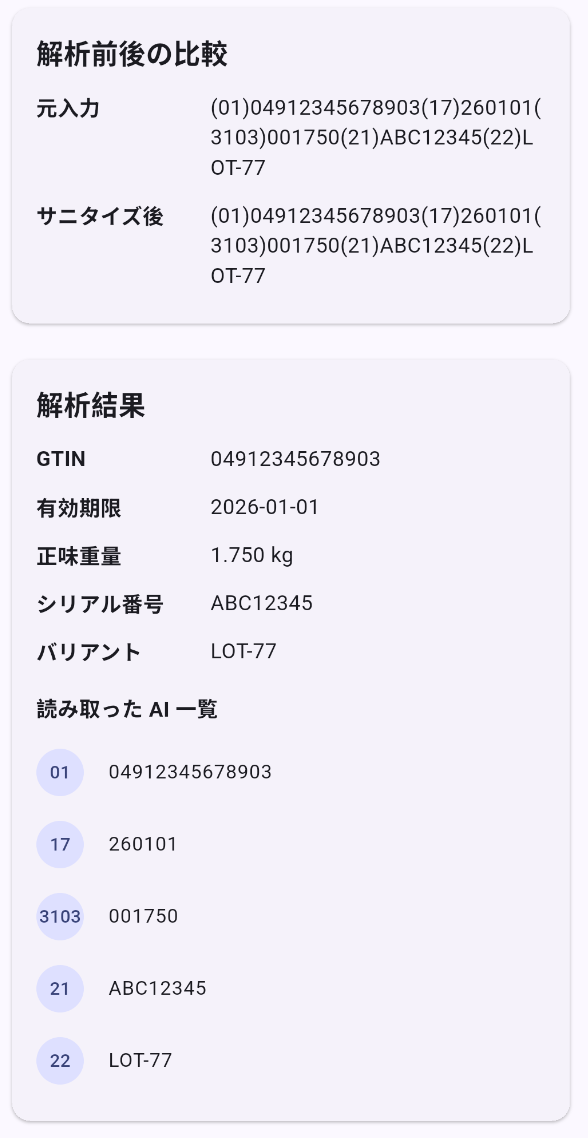
3103 は「kg 単位、小数点以下 3 桁」を意味します。値が 001750 なら、1750 / 1000 = 1.750 kg と解釈します。AI 側に小数点位置が埋め込まれているので、値文字列そのものに小数点はありません。
③ 必須項目不足は変換前にまとめて検出する
final List<String> missing = <String>[];
if (!fields.containsKey('01')) {
  missing.add('(01) GTIN');
}
if (!fields.containsKey('17')) {
  missing.add('(17) 有効期限');
}
if (weightElement == null) {
  missing.add('(310x) 正味重量');
}
if (missing.isNotEmpty) {
  throw Gs1ParseException('必須項目が不足しています: ${missing.join(' / ')}');
}
1 項目ずつ別の場所で失敗させるより、必須不足をまとめて返したほうが確認が早くなります。単一画面の入力フローへ進むときも、足りない項目を UI へそのまま出しやすくなります。
(17) の日付変換は、この記事では 2000 + YY の簡略ルールで実装しています。GS1 の運用では 50 年ウィンドウや日付 00 の扱いを考慮する場合があるため、実務へ持ち込むときは自社ルールと照らしてここを置き換えてください。
コードを貼り付けたら、次のコマンドで起動します。
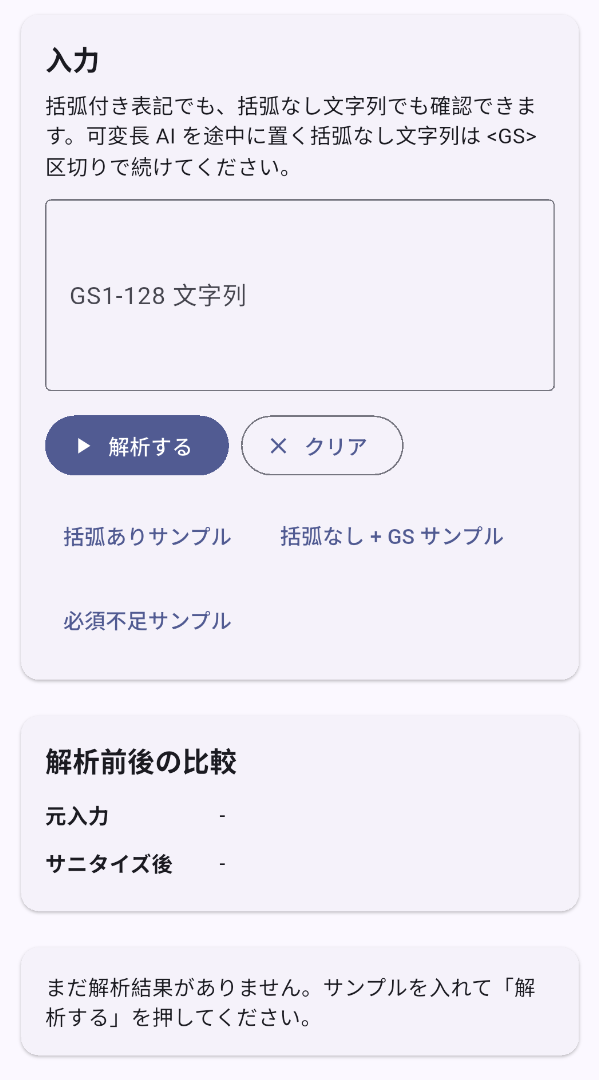
flutter run起動直後の画面は次のようになります。
5. サンプル入力で確認するポイント
スキャナがなくても、次の入力で主要挙動を確認できます。
| 入力例 | 期待結果 | 見るポイント |
|---|---|---|
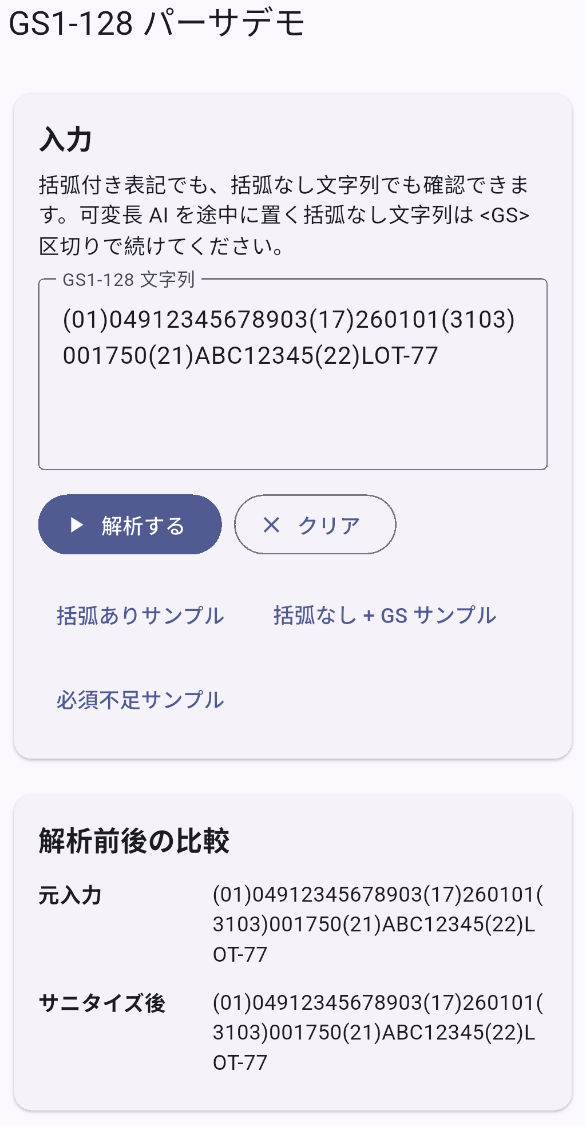
(01)04912345678903(17)260101(3103)001750(21)ABC12345(22)LOT-77 | 正常解析 | 括弧付きでも 5 項目を順に切り出せる |
010491234567890317260101310300175021ABC12345<GS>22LOT-77 | 正常解析 | 括弧なしでも、可変長 AI の間に GS があれば続きが読める |
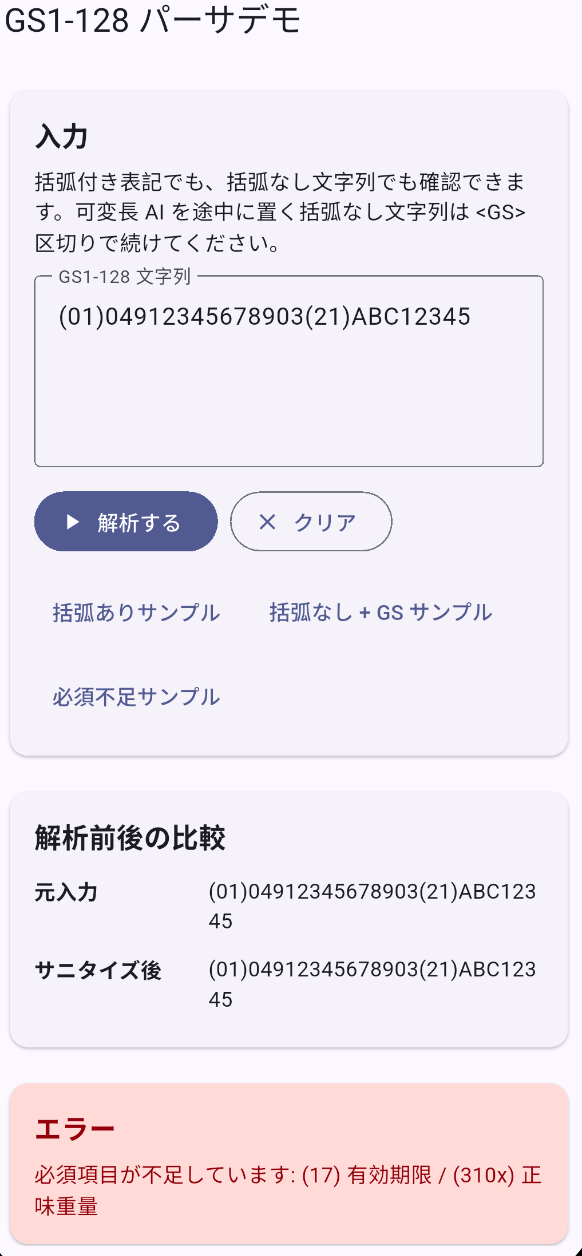
(01)04912345678903(21)ABC12345 | 必須不足エラー | (17) と (310x) が不足している理由がそのまま出る |
(01)04912345678903(17)261332(3103)001750 | 日付エラー | 261332 が日付として不正なため、変換で止まる |
(01)04912345678903(17)260101(3103)ABCDEF | 重量エラー | 6 桁数字でない値を弾ける |
括弧なしの例は、画面上の「括弧なし + GS サンプル」ボタンから入れると見え方を追いやすくなります。GS は制御文字なので、画面では <GS> として見せています。
可変長 AI を途中に置く括弧なし文字列で GS がない場合、このサンプルでは安全に次の AI を切り出せません。そこを無理に推測すると、偶然読めた文字列と本当に正しい構造を区別しにくくなります。
括弧付き入力を流した状態、解析結果、必須不足エラーは次の見え方です。
6. まとめ
外部パッケージなしで、GS1-128 の主要項目を Flutter だけで解析する最小構成を作りました。ここまでで、括弧あり / なし両対応、日付変換、重量変換、必須項目不足エラー表示までがそろいます。
続けて取り組むなら、次の順がつながりやすくなります。
- Flutterでスキャン入力を受けて処理する を見直し、入力欄の受け口とパース処理の境目を整理する
- Flutterで業務用バーコード読み取りアプリを作る(最小構成) を組み合わせ、カメラ入力でも同じパーサへ流せる形にする
- 単一画面入力フロー記事へ進み、解析済みデータに選択項目や保存条件を足す