Blade の延長で一覧画面を改善したい人向けに、Laravel 13 の fresh app へ Livewire 4 を追加し、検索・並び替え・ページネーションまでを 1 本で通す手順をまとめます。開始地点は空ディレクトリです。既存の記事を先に読んでいなくても進められます。
Livewire は、Blade を保ったままサーバー側の状態を UI へ反映できる Laravel 向けの仕組みです。この記事ではその中でも、一覧画面で効きやすい検索・並び替え・ページネーションに絞ります。
補助導線として、先に読んでおくと入りやすい記事は次の 2 本です。
どちらも未読のままで問題ありません。以下の手順だけで完走できます。
前提環境
- Windows 11
- WSL2(Ubuntu)
- VS Code(Remote - WSL)
- Docker Desktop
composer:2コンテナ- Laravel 13
- Livewire 4
- SQLite
以降のコマンドは、特記がない限り WSL 側ターミナルで実行します。
1. ゴールと非対象
この記事で到達する状態は次のとおりです。
/booksに Livewire 付きの一覧画面を表示できる- 検索入力に応じて一覧を絞り込める
- 列見出しのボタンで並び替えを切り替えられる
- 2 ページ目へ進んでも URL に状態を残せる
#[Url]、WithPagination、resetPage()の役割が分かる
今回は一覧改善に集中します。次の内容は扱いません。
- 認証、認可
- 作成 / 編集 / 削除フォーム
- Volt や page component
- テスト、CI、デプロイ
- Inertia / React / Vue との比較
2. 先に全体像をつかむ
実装の流れは 6 段です。
- fresh app を作って Laravel を起動する
- Livewire を追加する
Bookmodel、migration、Livewire component を作る- 一覧ページと route を作る
BookSeederでサンプルデータを入れるroute:list、tinker、ブラウザで確認する
作業ディレクトリは ~/projects/laravel-livewire-search-sort-pagination-demo にそろえます。
mkdir -p ~/projects/laravel-livewire-search-sort-pagination-demo
cd ~/projects/laravel-livewire-search-sort-pagination-demo
code .
Laravel プロジェクトは composer:2 コンテナから作成します。ホスト側へ PHP や Composer を直接入れずに済み、作業環境をそろえやすいからです。
docker run --rm -u "$(id -u):$(id -g)" -v "$(pwd):/app" -w /app composer:2 create-project laravel/laravel .3. fresh app を作成して起動する
compose.yml を作成します。
services:
  app:
    image: composer:2
    user: "${LOCAL_UID:-1000}:${LOCAL_GID:-1000}"
    working_dir: /app
    environment:
      HOME: /tmp
      XDG_CONFIG_HOME: /tmp/.config
    volumes:
      - ./:/app
    ports:
      - "8000:8000"
    command: php artisan serve --host=0.0.0.0 --port=8000
.env の該当部分は次のとおりです。
APP_URL=http://localhost:8000
DB_CONNECTION=sqlite
DB_DATABASE=/app/database/database.sqlite
続いてコンテナを起動します。
export LOCAL_UID="$(id -u)"
export LOCAL_GID="$(id -g)"
docker compose up -d
ブラウザで http://localhost:8000 を開き、Laravel の welcome 画面が見えれば準備完了です。
4. Livewire と一覧データの土台を作る
まず Livewire を追加します。
docker compose exec app composer require livewire/livewire次に、一覧で使う Book model と migration を作ります。
docker compose exec app php artisan make:model Book -m生成された database/migrations/*_create_books_table.php は次の内容に更新します。timestamp 部分は実行時刻によって変わります。
<?php

use Illuminate\Database\Migrations\Migration;
use Illuminate\Database\Schema\Blueprint;
use Illuminate\Support\Facades\Schema;

return new class extends Migration
{
    public function up(): void
    {
        Schema::create('books', function (Blueprint $table) {
            $table->id();
            $table->string('title');
            $table->string('author');
            $table->unsignedInteger('price');
            $table->timestamps();
        });
    }

    public function down(): void
    {
        Schema::dropIfExists('books');
    }
};
app/Models/Book.php を次の内容に更新します。
<?php

namespace App\Models;

use Illuminate\Database\Eloquent\Model;

class Book extends Model
{
    protected $fillable = [
        'title',
        'author',
        'price',
    ];
}
ここで Livewire component を作ります。
docker compose exec app php artisan make:livewire BookTable --classLivewire 4 の既定は single-file component です。php artisan make:livewire BookTable だけを実行すると 1 ファイル構成になります。今回は query string とページネーションの責務を PHP クラス側で追いやすくするため、--class を付けて class-based component にします。
5. 一覧 component とページを作る
app/Livewire/BookTable.php を次の内容に更新します。
<?php

namespace App\Livewire;

use App\Models\Book;
use Illuminate\Contracts\View\View;
use Livewire\Attributes\Url;
use Livewire\Component;
use Livewire\WithPagination;

class BookTable extends Component
{
    use WithPagination;

    #[Url(except: '')]
    public string $search = '';

    #[Url(except: 'created_at')]
    public string $sortField = 'created_at';

    #[Url(except: 'desc')]
    public string $sortDirection = 'desc';

    public function updatingSearch(): void
    {
        $this->resetPage();
    }

    public function sortBy(string $field): void
    {
        $allowedFields = ['title', 'author', 'price', 'created_at'];

        if (! in_array($field, $allowedFields, true)) {
            return;
        }

        if ($this->sortField === $field) {
            $this->sortDirection = $this->sortDirection === 'asc' ? 'desc' : 'asc';
        } else {
            $this->sortField = $field;
            $this->sortDirection = 'asc';
        }

        $this->resetPage();
    }

    public function render(): View
    {
        $books = Book::query()
            ->when($this->search !== '', function ($query) {
                $query->where(function ($subQuery) {
                    $keyword = '%' . $this->search . '%';

                    $subQuery->where('title', 'like', $keyword)
                        ->orWhere('author', 'like', $keyword);
                });
            })
            ->orderBy($this->sortField, $this->sortDirection)
            ->paginate(5);

        return view('livewire.book-table', [
            'books' => $books,
        ]);
    }
}
resources/views/livewire/book-table.blade.php を次の内容で作成します。
<div>
    <form class="toolbar" wire:submit.prevent>
        <label>
            検索
            <input
                type="search"
                wire:model.live.debounce.300ms="search"
                placeholder="タイトルまたは著者名で検索"
            >
        </label>
    </form>

    <table>
        <thead>
            <tr>
                <th>
                    <button type="button" wire:click="sortBy('title')">
                        タイトル
                    </button>
                </th>
                <th>
                    <button type="button" wire:click="sortBy('author')">
                        著者
                    </button>
                </th>
                <th>
                    <button type="button" wire:click="sortBy('price')">
                        価格
                    </button>
                </th>
                <th>
                    <button type="button" wire:click="sortBy('created_at')">
                        登録日
                    </button>
                </th>
            </tr>
        </thead>
        <tbody>
            @forelse ($books as $book)
                <tr>
                    <td>{{ $book->title }}</td>
                    <td>{{ $book->author }}</td>
                    <td>{{ number_format($book->price) }}円</td>
                    <td>{{ $book->created_at->format('Y-m-d') }}</td>
                </tr>
            @empty
                <tr>
                    <td colspan="4">該当する本はありません。</td>
                </tr>
            @endforelse
        </tbody>
    </table>

    <div class="pager">
        {{ $books->links('pagination.book-pagination') }}
    </div>
</div>
resources/views/pagination/book-pagination.blade.php を次の内容で作成します。
@if ($paginator->hasPages())
    <nav class="pagination" role="navigation" aria-label="ページネーション">
        <p class="pagination__summary">
            {{ $paginator->firstItem() }}-{{ $paginator->lastItem() }} / {{ $paginator->total() }} 件
        </p>

        <div class="pagination__controls">
            @if ($paginator->onFirstPage())
                <span class="pagination__button pagination__button--disabled" aria-disabled="true">
                    前へ
                </span>
            @else
                <button
                    type="button"
                    class="pagination__button"
                    wire:click="previousPage"
                    wire:loading.attr="disabled"
                    rel="prev"
                >
                    前へ
                </button>
            @endif

            <span class="pagination__status">
                {{ $paginator->currentPage() }} / {{ $paginator->lastPage() }} ページ
            </span>

            @if ($paginator->hasMorePages())
                <button
                    type="button"
                    class="pagination__button"
                    wire:click="nextPage"
                    wire:loading.attr="disabled"
                    rel="next"
                >
                    次へ
                </button>
            @else
                <span class="pagination__button pagination__button--disabled" aria-disabled="true">
                    次へ
                </span>
            @endif
        </div>
    </nav>
@endif
ページ本体として resources/views/books/index.blade.php を作成します。
<!doctype html>
<html lang="ja">
<head>
    <meta charset="utf-8">
    <meta name="viewport" content="width=device-width, initial-scale=1">
    <title>Books</title>
    @livewireStyles
    <style>
        body {
            font-family: sans-serif;
            margin: 0;
            background: #f7f7f7;
            color: #222;
        }

        main {
            max-width: 960px;
            margin: 40px auto;
            padding: 24px;
            background: #fff;
            border-radius: 16px;
            box-shadow: 0 12px 32px rgba(15, 23, 42, 0.08);
        }

        h1 {
            margin-top: 0;
        }

        .toolbar {
            margin-bottom: 16px;
        }

        input {
            width: 100%;
            max-width: 360px;
            margin-top: 8px;
            padding: 10px 12px;
            border: 1px solid #cbd5e1;
            border-radius: 8px;
        }

        table {
            width: 100%;
            border-collapse: collapse;
        }

        th,
        td {
            padding: 12px;
            border-bottom: 1px solid #e2e8f0;
            text-align: left;
        }

        button {
            border: 0;
            background: transparent;
            font: inherit;
            cursor: pointer;
            padding: 0;
            color: #0f172a;
            font-weight: 700;
        }

        .pager {
            margin-top: 20px;
        }

        .pagination {
            display: flex;
            flex-wrap: wrap;
            justify-content: space-between;
            align-items: center;
            gap: 12px;
        }

        .pagination__summary,
        .pagination__status {
            color: #475569;
            font-size: 14px;
        }

        .pagination__controls {
            display: flex;
            align-items: center;
            gap: 12px;
        }

        .pagination__button {
            display: inline-flex;
            align-items: center;
            justify-content: center;
            min-width: 72px;
            padding: 8px 14px;
            border: 1px solid #cbd5e1;
            border-radius: 999px;
            background: #fff;
            color: #0f172a;
            font-weight: 600;
        }

        .pagination__button[disabled],
        .pagination__button--disabled {
            border-color: #e2e8f0;
            background: #f8fafc;
            color: #94a3b8;
            cursor: not-allowed;
        }
    </style>
</head>
<body>
    <main>
        <h1>Livewireで本の一覧を操作する</h1>
        <p>検索、並び替え、ページネーションを Livewire でまとめて確認します。</p>
        <livewire:book-table />
    </main>

    @livewireScripts
</body>
</html>
routes/web.php は次の内容にします。
<?php

use Illuminate\Support\Facades\Route;

Route::redirect('/', '/books');
Route::view('/books', 'books.index')->name('books.index');
6. サンプルデータを入れて確認する
一覧画面は 2 ページ目がないとページネーションを確認しづらいので、8 件のサンプルデータを用意します。実検証では、長い配列を php artisan tinker --execute='...' へそのまま渡すと PsySH parse error が出ました。記事では再現しやすさを優先し、Seeder で投入します。
まず Seeder を作成します。
docker compose exec app php artisan make:seeder BookSeederdatabase/seeders/BookSeeder.php を次の内容に更新します。
<?php

namespace Database\Seeders;

use App\Models\Book;
use Illuminate\Database\Seeder;

class BookSeeder extends Seeder
{
    public function run(): void
    {
        $rows = [
            ['title' => 'Laravel Essentials', 'author' => 'Ken Aoki', 'price' => 3200, 'created_at' => now()->subDays(8), 'updated_at' => now()->subDays(8)],
            ['title' => 'Livewire Hands-On', 'author' => 'Hanako Sato', 'price' => 3600, 'created_at' => now()->subDays(7), 'updated_at' => now()->subDays(7)],
            ['title' => 'PHP Design Notes', 'author' => 'Ryo Tanaka', 'price' => 2800, 'created_at' => now()->subDays(6), 'updated_at' => now()->subDays(6)],
            ['title' => 'Docker Dev Guide', 'author' => 'Minoru Kato', 'price' => 4100, 'created_at' => now()->subDays(5), 'updated_at' => now()->subDays(5)],
            ['title' => 'SQLite Start', 'author' => 'Miku Ishikawa', 'price' => 2400, 'created_at' => now()->subDays(4), 'updated_at' => now()->subDays(4)],
            ['title' => 'Laravel Testing Intro', 'author' => 'Ichiro Yamada', 'price' => 3900, 'created_at' => now()->subDays(3), 'updated_at' => now()->subDays(3)],
            ['title' => 'Practical Livewire', 'author' => 'Ken Aoki', 'price' => 4300, 'created_at' => now()->subDays(2), 'updated_at' => now()->subDays(2)],
            ['title' => 'Eloquent Cookbook', 'author' => 'Takumi Nakamura', 'price' => 3500, 'created_at' => now()->subDay(), 'updated_at' => now()->subDay()],
        ];

        Book::query()->delete();
        Book::query()->insert($rows);
    }
}
ここまでできたら migration と seed を流します。
docker compose exec app php artisan migrate
docker compose exec app php artisan db:seed --class=BookSeeder
route を確認します。
docker compose exec app php artisan route:list --name=booksbooks.index が見えていれば、一覧画面への入口が確認できます。
次に tinker で件数を確認します。
docker compose exec app php artisan tinker --execute='echo \App\Models\Book::query()->count(), PHP_EOL;'8 と表示されれば、Seeder の投入は完了です。
最後にブラウザで http://localhost:8000/books を開いて確認します。ポートを 8001:8000 に変えた場合は http://localhost:8001/books を開いてください。
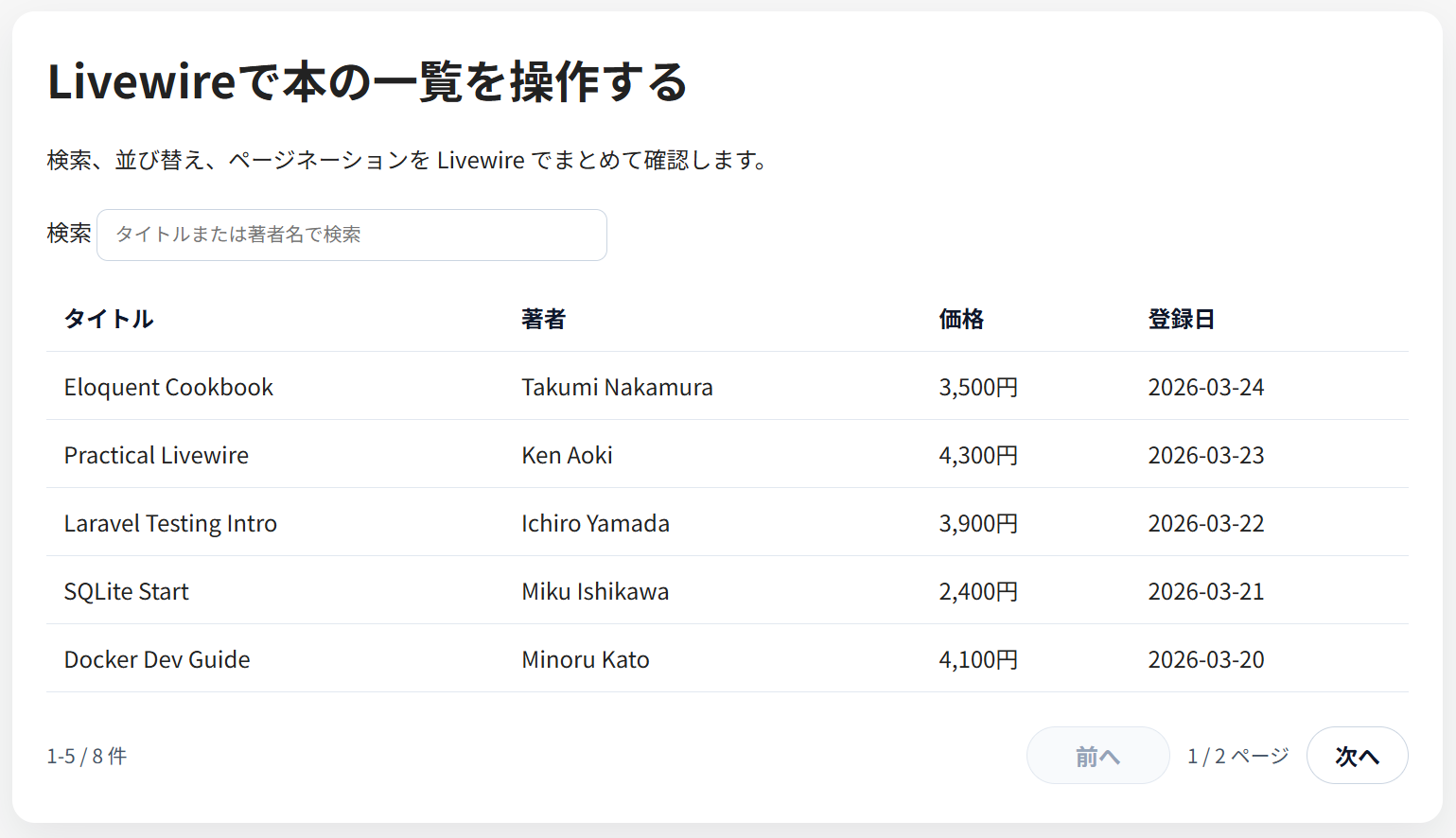
- 1 ページ目に 5 件出る
- 2 ページ目へ進める
- 検索欄へ
Kenなどを入れると一覧が絞り込まれる - 列見出しを押すと並び順が変わる
検索欄、列見出し、ページャがそろった状態は次のとおりです。
7. コードのポイント
#[Url] と WithPagination で状態を URL へ残す
use Livewire\Attributes\Url;
use Livewire\WithPagination;

class BookTable extends Component
{
    use WithPagination;

    #[Url(except: '')]
    public string $search = '';

    #[Url(except: 'created_at')]
    public string $sortField = 'created_at';

    #[Url(except: 'desc')]
public string $sortDirection = 'desc';search、sortField、sortDirection を URL 同期対象にしているので、一覧の状態をリロード後も維持しやすくなります。WithPagination を入れると ?page=2 のようなページ番号も Livewire 側で扱えます。
検索や並び替えを変えたときは resetPage() を呼ぶ
public function updatingSearch(): void
{
    $this->resetPage();
}

public function sortBy(string $field): void
{
    if ($this->sortField === $field) {
        $this->sortDirection = $this->sortDirection === 'asc' ? 'desc' : 'asc';
    } else {
        $this->sortField = $field;
        $this->sortDirection = 'asc';
    }

    $this->resetPage();
}
検索条件や並び替え条件が変わった直後に 2 ページ目のままだと、該当件数が減ったときに空ページへ移ることがあります。条件更新時に resetPage() を呼んでおくと、このずれを避けやすくなります。
Blade 側は wire:model.live とカスタムページネーションを最小でつなぐ
<input
    type="search"
    wire:model.live.debounce.300ms="search"
    placeholder="タイトルまたは著者名で検索"
>

<div class="pager">
    {{ $books->links('pagination.book-pagination') }}
</div>

<button
    type="button"
    class="pagination__button"
    wire:click="nextPage"
    wire:loading.attr="disabled"
    rel="next"
>
    次へ
</button>
wire:model.live.debounce.300ms にすると、入力が止まってから 300ms 後に検索条件が反映されます。ページネーションは Tailwind 前提の既定 view をそのまま使わず、pagination.book-pagination へ切り出しました。これで手書き CSS のページでも崩れにくく、wire:click="nextPage" や previousPage だけで Livewire の遷移を保てます。
8. 詰まりやすい点
@livewireStylesと@livewireScriptsを忘れると、初期 HTML は出ても Livewire の更新が動きません。orderBy()に request 由来の文字列をそのまま渡すと、意図しない列名を受け取れる形になります。今回のように許可列を固定してください。tinker --executeへ長い配列を直接埋め込むと、実検証では PsySH parse error になりました。大量データは Seeder のほうが安定します。- Tailwind を入れていないページで
$books->links()の既定 view をそのまま使うと、ページネーションが崩れることがあります。今回はpagination.book-paginationを指定するのが対策です。 - 8000 番ポートが使用中の環境では、
compose.ymlの公開ポートを8001:8000などへ変更し、.envのAPP_URLも同じ番号へそろえてください。番号がずれると確認 URL もずれます。
9. まとめ
fresh app から始めても、Livewire を使えば Blade 主線のまま一覧画面へ検索、並び替え、ページネーションを足せます。今回の要点は、#[Url] で状態を URL へ残し、resetPage() でページ番号のずれを防ぎ、Blade 側は wire:model.live と wire:click の最小構成に留めることです。
次に Laravel 側を広げるなら、LaravelでLivewireを始める と見比べて役割の差を整理するか、画面側ではなく API 側へ進む LaravelでSanctum認証APIを作る が流れをつなぎやすい導線です。